GraphQL Subscriptions are a way to send real-time updates to clients when data changes.
This is a good solution for applications that need to publish events in real-time. It also provides an alternative for REST APIs for those who want to build their APIs in a more efficient way.
A GraphQL subscription is a GraphQL operation that can be used to subscribe to changes in data. It is similar to a query, but instead of returning a single result, it returns a stream of results.
In this article, we will look at how to implement GraphQL subscriptions with Node.js and Redis.
TL;DR
Link to the GitHub repository.
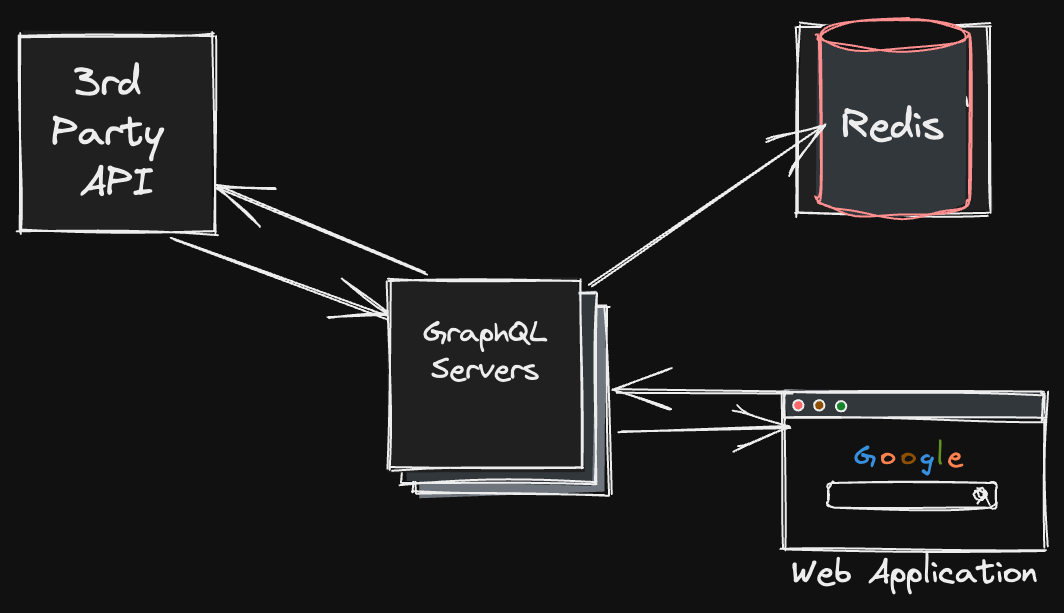
What is GraphQL?
GraphQL is a query language for APIs and a runtime for fulfilling those queries with your existing data. GraphQL provides a complete and understandable description of the data in your API, gives clients the power to ask for exactly what they need and nothing more, makes it easier to evolve APIs over time, and enables powerful developer tools.
What is a GraphQL Subscription?
A GraphQL subscription is a GraphQL operation that can be used to subscribe to changes in data. It is similar to a query, but instead of returning a single result, it returns a stream of results.
What is Redis?
Redis is an open source (BSD licensed), in-memory data structure store, used as a database, cache and message broker. It supports data structures such as strings, hashes, lists, sets, sorted sets with range queries, bitmaps, hyperloglogs, geospatial indexes with radius queries and streams.
What is PubSub?
PubSub is a pattern that allows you to publish messages to a topic and subscribe to that topic. This is useful for decoupling applications and services from each other.
What is PubSub in GraphQL?
PubSub is a pattern that allows you to publish messages to a topic and subscribe to that topic. This is useful for decoupling applications and services from each other.
Prerequisites
- Node.js
- NestJS
- Redis
Getting Started
*Note: This article assumes you have a basic understanding of GraphQL and TypeScript.
To get started, we will create a new NestJS project.
nest new graphql-subscriptionsInstalling Dependencies
We will need to install the following dependencies:
@nestjs/graphql- GraphQL module for NestJSgraphql-subscriptions- GraphQL subscriptionsgraphql-tools- GraphQL toolsioredis- Redis client for Node.js@nestjs/config- Configuration module for NestJS
npm i @nestjs/graphql graphql-subscriptions graphql-tools ioredis @nestjs/configSetting up Redis
We will use Redis as our PubSub engine. To set up Redis, we will use the @nestjs/config module.
npm i @nestjs/config// src/config/config.module.ts
import { Module } from '@nestjs/common';
import { ConfigModule } from '@nestjs/config';
@Module({
imports: [
ConfigModule.forRoot({
isGlobal: true,
}),
],
})
export class ConfigModule {}// src/config/config.service.ts
import { Injectable } from '@nestjs/common';
import { ConfigService } from '@nestjs/config';
@Injectable()
export class ConfigService {
constructor(private configService: ConfigService) {}
getRedisHost(): string {
return this.configService.get<string>('REDIS_HOST');
}
getRedisPort(): number {
return this.configService.get<number>('REDIS_PORT');
}
}// src/config/config.ts
export default () => ({
redis: {
host: process.env.REDIS_HOST,
port: process.env.REDIS_PORT,
},
});// src/main.ts
import { NestFactory } from '@nestjs/core';
import { AppModule } from './app.module';
import { ConfigService } from './config/config.service';
async function bootstrap() {
const app = await NestFactory.create(AppModule);
const configService = app.get(ConfigService);
await app.listen(3000);
}
bootstrap();Setting up GraphQL
We will use the @nestjs/graphql module to set up GraphQL.
// src/app.module.ts
import { Module } from '@nestjs/common';
import { GraphQLModule } from '@nestjs/graphql';
import { ConfigModule } from './config/config.module';
import { ConfigService } from './config/config.service';

@Module({
  imports: [
    ConfigModule,
    GraphQLModule.forRoot({
      autoSchemaFile: true,
      installSubscriptionHandlers: true,
      context: ({ req }) => ({ req }),
    }),
  ],
})
export class AppModule {}
Setting up PubSub
We will use the graphql-subscriptions package to set up PubSub.
// src/pubsub/pubsub.service.ts
import { Injectable } from '@nestjs/common';
import { PubSub } from 'graphql-subscriptions';
import { RedisPubSub } from 'graphql-redis-subscriptions';
import { ConfigService } from '../config/config.service';

@Injectable()
export class PubSubService {
  private pubSub: PubSub;

  constructor(private configService: ConfigService) {
    this.pubSub = new RedisPubSub({
      connection: {
        host: this.configService.getRedisHost(),
        port: this.configService.getRedisPort(),
      },
    });
  }

  publish(triggerName: string, payload: any) {
    this.pubSub.publish(triggerName, payload);
  }

  subscribe(triggerName: string) {
    return this.pubSub.asyncIterator(triggerName);
  }
}
Creating a Resolver
We will create a resolver that will publish an event every 5 seconds.
// src/pubsub/pubsub.resolver.ts
import { Resolver, Subscription } from '@nestjs/graphql';
import { PubSubService } from './pubsub.service';

@Resolver()
export class PubSubResolver {
  constructor(private pubSubService: PubSubService) {}

  @Subscription(() => String, {
    name: 'pubSub',
    resolve: (payload: any) => payload,
  })
  pubSub() {
    return {
      subscribe: () => this.pubSubService.subscribe('pubSub'),
    };
  }
}
Testing the Subscription
We can test the subscription using the GraphQL Playground.
npm run start:devsubscription {
pubSub
}{
"data": {
"pubSub": "Hello World!"
}
}Conclusion
In this article, we learned how to set up GraphQL subscriptions using Redis as the PubSub engine. We also learned how to publish and subscribe to events using GraphQL subscriptions.