The Outbox Pattern: A Strategic Approach to Message Queuing in Distributed Systems
The outbox pattern provides a robust framework for decoupling producers from consumers within a distributed architecture. Primarily, it facilitates asynchronous communications between different services, enhancing reliability and scalability.
This narrative delves into the practical implementation of the outbox pattern through a Go API.
TL;DR
Link to the GitHub repository for a practical demonstration.
Table of Contents
- Introduction
- What are we building?
- Prerequisites
- How to Implement the Outbox Pattern with a go API
- Conclusion
- Further Reading
Introduction
In this post, we’ll explore how to implement the Outbox Pattern within Go APIs, building upon the foundational understanding we discussed in a previous article on the Outbox Pattern using .NET. Refer to our detailed guide on the Outbox Pattern here. ORMs are not as prevalent in the Go ecosystem as they are in .NET, but we can still achieve the same results by using GORM, a popular ORM for Go.
In a future post, we can explore how to implement the Outbox Pattern without an ORM, using raw SQL queries to interact with the database. This approach is more explicit and manual since there is no ‘hook’ to intercept database transactions like we have with ORMs.
What are we building?
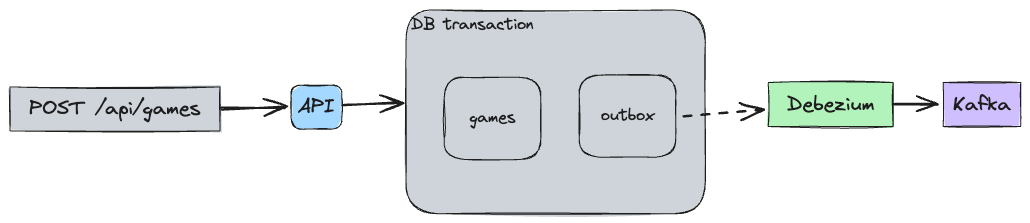
In this guide, we’ll develop a sample Go version of an api that implements the Outbox Pattern. We will use an ORM,(GORM) to handle intercepting database transactions and writing changes to an outbox table. We will then publish these changes to some queue (RabbitMQ, Kafka, etc.) for consumption by other services.
Here’s an overview of what we will be building:
Prerequisites
Before we begin, make sure you have the following installed on your machine:
(Optional) I’ll be using Atlas for migrations, but you can use any other tool you’re comfortable with.
How to Implement the Outbox Pattern with a Go API
1. Create an Outbox Table
We’ll create a database schema to store our Games and Platforms. We’ll also add an outbox table to store messages that need to be published to the message queue.
The database schema we’ll be using is as follows:
CREATE SCHEMA IF NOT EXISTS public;

CREATE TABLE outbox (
    id UUID PRIMARY KEY DEFAULT gen_random_uuid(),
    aggregateid TEXT NOT NULL,
    aggregatetype TEXT NOT NULL,
    type TEXT NOT NULL,
    payload JSONB
);

CREATE TABLE platforms (
    id BIGINT generated by default as identity NOT NULL PRIMARY KEY,
    entity_id BIGINT NOT NULL,
    name TEXT NOT NULL
);

CREATE TABLE games (
    id BIGINT generated by default as identity NOT NULL PRIMARY KEY,
    entity_id BIGINT NOT NULL UNIQUE,
    name TEXT NOT NULL,
    summary TEXT,
    url TEXT,
    release_date DATE
);

CREATE TABLE game_platforms (
    game_id BIGINT NOT NULL,
    platform_id BIGINT NOT NULL,
    PRIMARY KEY (game_id, platform_id)
);
If you’re using Atlas, you can run the following command to apply the schema:
atlas schema apply -u "postgresql://postgres:postgres@localhost:5432/postgres?sslmode=disable" \
    --to file://schema.sql \
    --dev-url "postgresql://postgres:example@localhost:5432/dev?sslmode=disable"
Here’s how you can set this up using GORM:
// game.go

type Game struct {
	ID          int64             `json:"-" db:"id"`
	EntityID    int64             `json:"entity_id" db:"entity_id"`
	Name        string            `json:"name" db:"name"`
	Summary     string            `json:"summary" db:"summary"`
	Url         string            `json:"url" db:"url"`
	ReleaseDate time.Time         `json:"releaseDate" db:"release_date"`
	Events      []*internal.Event `json:"-" gorm:"-"`
}
Notice that we’re using the internal.Event type to store the events that need to be published to the outbox table. This is a custom type that we’ll define later in the article.
We don’t need to define a a struct for the outbox table as we’ll be using GORM’s Create method hook to insert messages directly into the outbox table.
// persistence.go

func OpenSQLConnection() (Connection, error) {
  // ...

	err = db.Callback().Create().Before("gorm:create").Register("outbox:insert", insertOutbox)
	if err != nil {
		return nil, err
	}
  // ...
	return &sqlConnection{
		DB: db,
	}, nil
}
2. Write Changes to the Outbox Table
Whenever a transaction is committed to the database, you should write the changes to the outbox table before publishing them to the message queue. This ensures that the data is staged in the outbox before being sent to the consumer.
We can now define the insertOutbox function that will be called before a record is created in the database. In the same transaction, we’ll insert the events into the outbox table and delete it directly after within the same transaction.
// persistence.go
func insertOutbox(db *gorm.DB) {
	if db.Statement.Schema != nil {
		if db.Error != nil {
			return
		}
		for _, field := range db.Statement.Schema.Fields {
			if field.Name == "Events" {
				val, isEmpty := field.ValueOf(db.Statement.Context, db.Statement.ReflectValue)
				if !isEmpty {
					if evts, ok := val.([]*events.Event); ok {
						outboxSession := db.Session(&gorm.Session{SkipHooks: true})
						for _, evt := range evts {
							err := outboxSession.Exec("INSERT INTO outbox (id,aggregateid, aggregatetype, type, payload) VALUES (?,?,?,?,?)", evt.ID, evt.AggregateId, evt.AggregateType, evt.EventType, evt.Payload).Error
							if err != nil {
								db.AddError(err)
							}
							err = outboxSession.Exec("DELETE FROM outbox WHERE id = ?", evt.ID).Error
							if err != nil {
								db.AddError(err)
							}
						}
					}
				}
				break
			}
		}
	}
}
For the above to work, we need to ensure that our domain aggregates have a slice of events that need to be published to the outbox table. We can define the Event struct as follows:
// event.go
type Event struct {
	ID            uuid.UUID `db:"id"`
	AggregateId   string    `db:"aggregateid"`
	AggregateType string    `db:"aggregatetype"`
	EventType     string    `db:"type"`
	Payload       *[]byte   `db:"payload"`
}
which can be used in our domain aggregates like so:
// game.go


// ...
func (g *Game) AddEvent(event *internal.Event) {
	g.Events = append(g.Events, event)
}

func GameCreatedEvent(item *Game) *internal.Event {
	return generateEvent(item, "GameCreatedEvent")
}
With the above setup, we can now publish events to the outbox table whenever a transaction is committed to the database. for example, when a new game is created, we can publish a GameCreatedEvent to the outbox table as part of the same transaction that creates the game in the database.
// service.go
func (s *service) Create(aggregate internal.Aggregate) (game *domain.Game, err error) {
  // ...
	value.AddEvent(domain.GameCreatedEvent(value))
  // ...
}
3. Publish Messages to the Queue
Once the changes have been written to the outbox table, we need a way to publish these messages to the message queue. This can be by polling the outbox table for new messages and publishing them to our chosen message broker.
It’s a simple approach that can work well in some scenarios, however there are challenges with managing the state of the outbox table, locking rows, and ensuring that messages are only published once.
It also requires that the application is fully aware of the outbox table and how to interact with it, which can lead to tight coupling between the application and the message broker.
One approach is make use of something like Debezium to stream changes from the database to a message broker. This can be a more robust solution that can handle more complex scenarios and provide better guarantees around message delivery.
In this post, we’ll do that and use Debezium to stream changes from our outbox table to a Kafka topic using the Outbox Event Router. Due to the away we have configured our outbox table, it’s versatile enough to be used with any message broker and it also allows us to version our events.
Once you have the docker compose stack running, you can add the Outbox connector with the http request to http://localhost:8083
4. How the Outbox Event Router Works
The Outbox Event Router is a Debezium transformation that reads change events from a database table and publishes them to a Kafka topic. This can be more effective than polling the database for changes, as it allows you to stream events in real-time as they occur.
This connector works with PostgreSQL, MySQL, and SQL Server databases, and it can be configured to filter events based on the table, schema, or other criteria. This allows you to publish only the events you’re interested in, reducing the amount of data that needs to be processed. It also works with MongoDB change streams, allowing you to stream events from NoSQL databases as well.
Conclusion
In this post, we explored how to implement the Outbox Pattern with a Go API. We used GORM to intercept database transactions and write changes to an outbox table, which we then published to a message queue using Debezium. This approach allows us to decouple the message broker technology from our application and keep the application itself simple and focused on its core functionality.
An ORM was used in this example, but you can achieve the same results without an ORM, however we need to be more explicit in writing to the outbox table and managing transactions with some dispatcher logic.
In a future post, we can explore how to implement the Outbox Pattern without an ORM, and without using Debezium.